Cheam School
Cheam School is a boarding and day school in Berkshire, running from nursery to sixth form on a single site, and home to almost 400 children. Founded in 1645, it holds the distinction of being the oldest private school in England. That is a long tradition to carry, and you might expect a school that old to be set in its ways. Cheam is anything but.
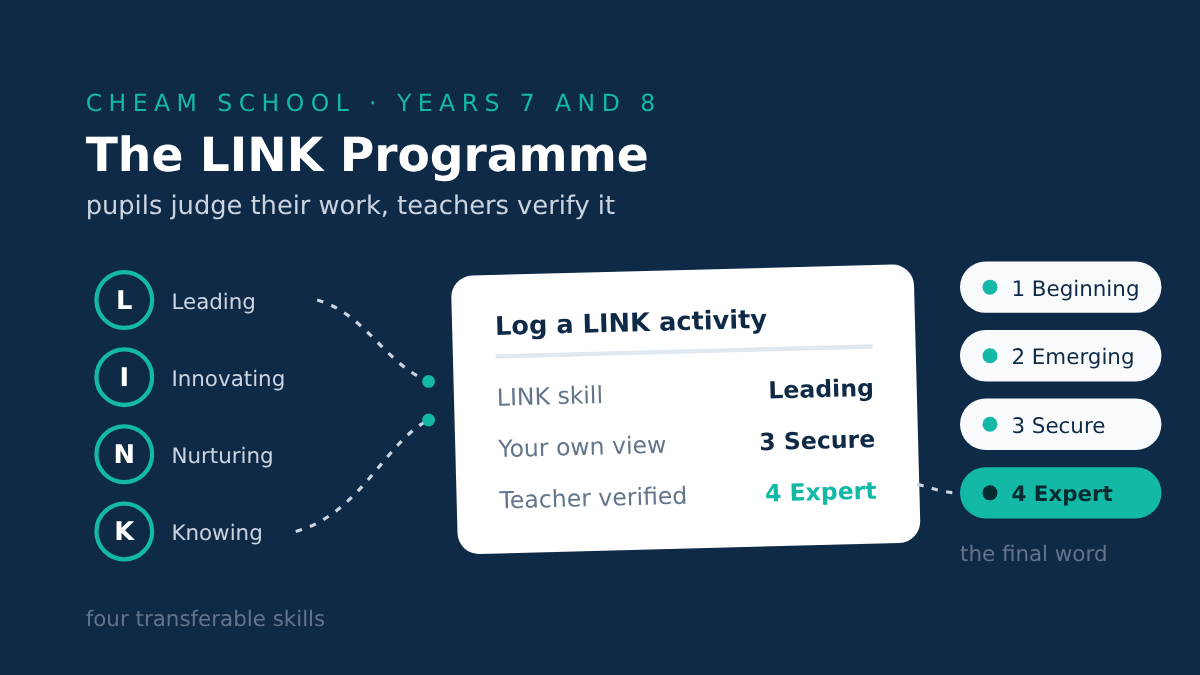
We have written about Cheam before, and their work on character education. They have not stood still since. This time they have come to us with a new framework of their own, called LINK, and a clear idea of how they wanted Kloodle to run it.
Running LINK on Kloodle
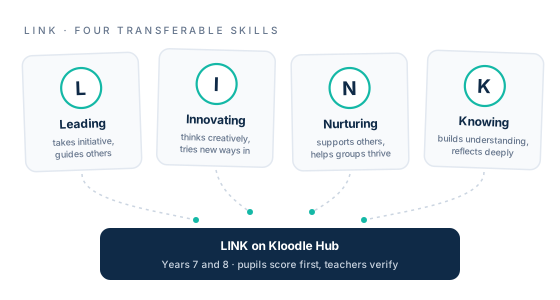
The LINK framework is going to be run across Years 7 and 8 and is built around four transferable skills:
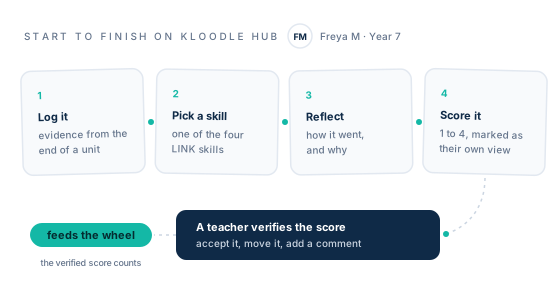
Pupils submit evidence and a short reflection at the end of a unit of work, judge how well they think they have done and staff then confirm a final score.
That last part is the clever bit, and we will come to it. But the whole thing, start to finish, runs on Kloodle Hub. The pupil logs the activity on the platform, chooses the skill, writes the reflection, suggests a score, and a teacher verifies it. The aim of the programme is not just to record what a young person has achieved, but to build their awareness of how well they have done it, and why.
Leading, Innovating, Nurturing, Knowing
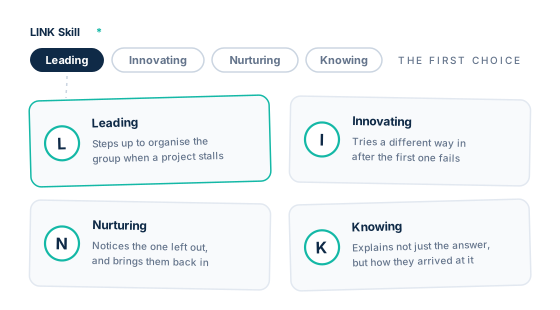
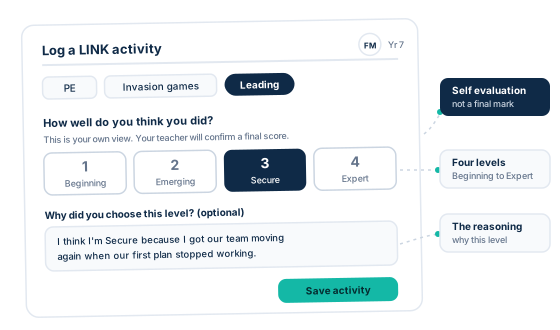
When a pupil opens the Log LINK Activity form on Kloodle, the first thing they do is choose which of the four skills their work shows. They are worth spelling out.
- Leading: Taking initiative, guiding others and shaping a shared effort. The pupil who steps up to organise the group when a project has stalled.
- Innovating: Thinking creatively, solving problems and trying new approaches. The pupil who tries a different way in after the first one has failed.
- Nurturing: Supporting others, showing care and helping a group thrive. The pupil who notices the one left out, and brings them back in.
- Knowing: Building understanding, reflecting and deepening what is learned. The pupil who can explain not just the answer, but how they arrived at it.
How Well Do You Think You Did?
Here is the part that makes LINK more than another way of logging activities. When a pupil submits their work on Kloodle, before any teacher has seen it, they are asked a simple question: how well do you think you did?
They choose a score on a four-point scale. One is Beginning, two is Emerging, three is Secure, four is Expert. Kloodle labels it clearly as their own view, a self-evaluation and not a final mark, so there is no confusion about what is happening. The pupil is being asked to stop and judge the quality of their own work.
Most systems capture what a young person did. Very few ask the young person what they made of it. That pause, that moment of honest self-appraisal before anyone else weighs in, is where the real thinking happens, and it is built into the form.
The Teacher Has the Final Word
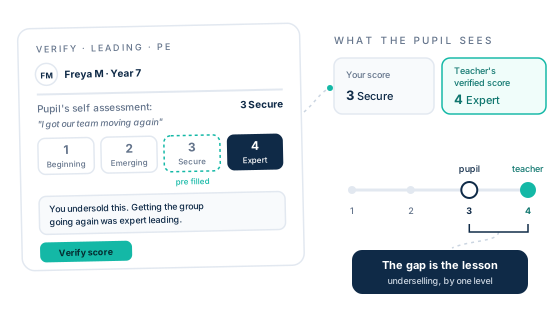
The pupil suggests. The teacher decides. On the verification screen, the pupil's own score arrives pre-filled, so a member of staff can accept it with a single tap or move it up or down as their professional judgement requires. They can add a comment too, which is especially useful where they have changed the score. Kloodle then stores the verified score as the one that counts for tracking and reporting.
The interesting thing is not the score itself. It is the gap. A pupil who marked themselves Secure and hears Expert learns they are underselling. A pupil who claimed Expert and hears Secure learns something more valuable still. That gap between what a young person thinks of their work and what an expert thinks of it is not an error to be tidied away. It is the whole point, and it is where the best conversations happen.
The LINK Wheel
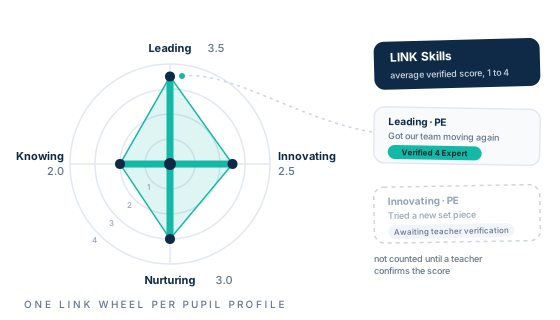
Every pupil has a LINK wheel on their Kloodle profile, with a spoke for each of the four skills. Each spoke reaches out according to the average verified score for that skill. It gives a pupil, and their teachers, a clear picture of where they are strong and where there is room to grow.
One detail matters here. Only verified scores feed the wheel. Work a pupil has logged but staff have not yet confirmed does not move it. So the wheel always reflects confirmed judgement, never a pupil's own optimistic guess. Cheam has already set the wheel up on the platform, so they are ready to go.
Built Around the School, Not the Other Way Round
This is the part we are proudest of. Cheam did not pick a feature off a shelf. They arrived with their own framework, their own four skills, their own four-point scale, and their own idea of a pupil scoring first and a teacher verifying second. Our job was to make Kloodle fit it.
Like everything on Kloodle, the language and the mechanics are the school's to shape. LINK looks and works the way Cheam wanted it to, because it is Cheam's programme. We just made sure the platform could carry it, cleanly and without fuss.
Starting Small
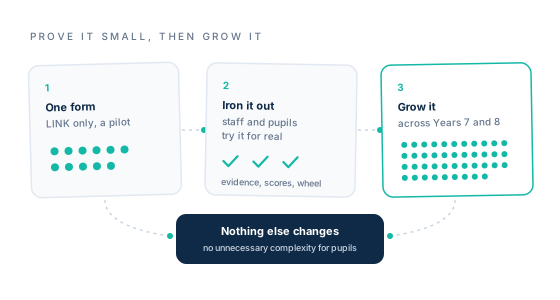
Sensibly, Cheam is starting contained. The pilot covers LINK only, and can be trialled with a single form before any wider roll-out. Nothing else in the platform changes for their pupils. It is the same instinct that served them well the first time round: prove it small, iron out anything that needs ironing out, then grow it. Enhance an already effective platform without adding unnecessary complexity.
Let's Get Going
Cheam has a habit of doing things thoughtfully, and LINK is no exception. A framework which teaches young people to judge the quality of their own work, and then shows them how close they came, is exactly the kind of quietly ambitious idea we love to see a school run on Kloodle. As ever with Cheam, watch this space.